Connected Porosity
The Connected Porosity feature is only available for Dragonfly Pro. Contact ORS for information about the availability of this version of Dragonfly Pro.
In some geophysical applications, such as those related to the partitioning of samples into volumetric components, it is important to distinguish between connected and unconnected pores. Dragonfly Pro provides an automated segmentation analysis routine that identifies which region of interest segments are connected to the borders of its volume, subvolume, or to the faces of a clipping plane and which pores are not. These segments are classified as connected porosity and non-connected porosity, respectively.
Connected porosity… Is defined as the void space through which an uninterrupted path exists between the borders of a volume, subvolume, or to the faces of a clipping plane.
Non connected porosity… Is defined as the void space that is not connected to the outside of a volume, subvolume, or to the faces of a clipping plane. Can be calculated as the total porosity minus connected porosity.
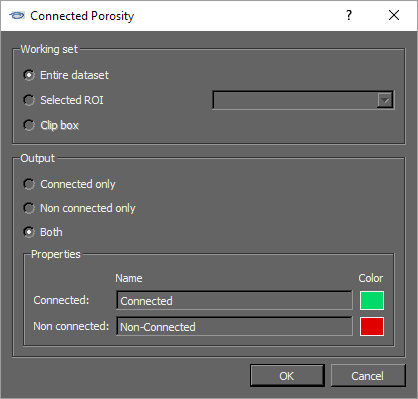
The options for determining connected and non-connected porosity are available in the Connected Porosity dialog. The results of this workflow are new regions of interest.
Connect Porosity dialog
New regions of interest, along with their volumes and comparative volumes, are available in the Data Properties and Settings panel to describe porosity within a sample (see Statistical Properties for a description of the statistics available in the lower section of the panel).
Connected porosity results

 How to Determine Porosity
A number of preliminary steps may be required if you plan to determine porosity within a subset of your volume. You can create a region of interest that describes the subvolume you plan to analyze or you can define the subvolume by clipping.
- Create a region of interest that describes the total porosity, or void space, within your sample.
- Right-click the required region of interest in the Data Properties and Settings dialog and then choose Connected Porosity in the pop-up menu.
The Connected Porosity dialog appears.
- Select the working set you need to analyze — Dataset, Mask, or Clip box — in the Working set box as follows:
Dataset… Determines porosity within the selected region of interest.
Mask… Determines porosity within a subset of the selected region of interest. Choose the region of interest that describes the subvolume in the drop-down list.
Clip box… Determines porosity within a subset of the selected region of interest that is defined by the clipping box.
- Select the required output in the Output box as follows:
Connected only… Determines connected porosity only. The result will be a region of interest that describes connected porosity as a percentage of the total volume or subvolume.
Non-connected only… Determines non-connected porosity only. The result will be a region of interest that describes non-connected porosity as a percentage of the total volume or subvolume.
Both… Determines connected and non-connected porosity. The result will be two regions of interest that describe total porosity.
- Enter a name for each selected output in the Properties box. You can also choose a color for each selected output, recommended.
To choose a color, click the Color swatch and then choose a new color in the Color Chooser dialog (see Choosing Colors)
- Click the OK button.
New region or regions of interest appear in the Data Properties and Settings panel. Information related to the region of interest(s), such as volume percentages, is available. See ROI Properties and Settings.